Tampilkan postingan dengan label a. Tampilkan semua postingan

Tips for Buying a PC


Currently buying a computer is present actually not an easy job because a lot of options and types of computer hardware manufacturers offered.
When buying a computer, the choice of processors should be a major consideration, because the processor plays an significant role for computer performance.  Currently there are two significant competing vendors in the technology of the AMD and Intel processors.  Both have their own advantages.  You can just determine the need for what you want and the type of processor that are best suited to your needs.

The motherboard is the next consideration; try to get this type of motherboard you with the most advanced technology, so it will facilitate the process of upgrading computers in the future.
Memory plays a fairly important as well in computer performance.  at this time DDR3 becomes the choice of computer manufacturing.  For a cheaper choice you may be able to use DDR2 memory types, but according to experience in choosing the type of memory try to select the memory with most new technologies because it will facilitate the development stage of computer hardware.  For memory requirements to support current programs are advised to use a memory with a minimum capacity of 4 GB to ensure the performance of your computer can run well and fast.
Data storage becomes the next consideration for buying a computer.  Large capacity and speed with the speed of the hard drive gets to be an option for choosing the type of hard drive.  Hard drive with a minimum capacity of 500 GB may be needed for now because a lot of new software that is consuming the hard drives capacity with a very large number.  Speed of 10,000 rpm hard drive is as well needed to ensure faster computer performance.  Consider also to use the system with USB 2.0 and IEEE 1394 ports.
Although the current average of motherboards hold included on board VGA, but for maximum results you keep your VGA card has its own because in terms of quality of the displayed image will be very much different from the picture quality from the on board VGA.  PCIe slots may be an option for the moment with a capacity of at least 512 mb VGA but for stability and performance of computer systems is recommended that you use VGA with a capacity of 1 GB.
Next is the monitor, a reliable PC that will not work unless it is supported by a reliable monitor.  There are three choices of monitors are CRT, LCD and LED, perhaps for the current selection of LCD and LED are very apt to be your consideration, and also the right size for your needs.
As a complement to multi-media system you may consider choosing speakers with good quality, as this will increase your comfort in using computers.
Read More..

The security database on the server does not have a computer account for this workstation trust relationship

We recently has this error message appear when trying to log on Windows 7 workstations to our Windows 2003 domain server.
"The security database on the server does not have a computer account for this workstation trust relationship."
We trawled through the Google searches for this message and there are pages of reports of this error.
Let me give you the circumstances.
Our domain server failed. We could not get it to get through POST and BIOS to try to find and operating system. That was the first big Ouch.
So we rebuilt the server on to new hardware and configured it, as we thought, the same. We initially had some issues with DNS and NICs not doing as they should but the upshot was that our 2 Windows 7 workstations could not connect to the domain. Please note this did not affect our remaining XP workstation which logged just fine.
After looking at the Goggle responses we noticed that we had rebuilt the domain but missed off the .local on the domain name.
So we rebuilt being more careful next time. Even so we got a capital letter in the wrong place in the domain name. So we rebuilt a third time. This time we are sure we got everything right. It made not a jot of difference.
Other websites had suggested we disconnect from the domain and reconnect to the new domain. Not an iota of difference.
Finally we had to reinstall the operating system on both our Windows 7 machines.
One side effect of this, despite having installed onto completely new hard disks to preserve the data on the old disk, is that on one of the machines we have lost ALL out Outlook pst files. Some emails going back 6 years with important information.
Couple this with the total data loss of all information on the server did not make us very happy.
I will finish with this comment. Why, oh why, Microsoft is it so hard to get your systems to talk to each other. This is hardly a ringing endorsement for the improvements in Windows 7 when XP performs better in what was already a very fraught situation. Please try to do better next time.
Read More..

Spherize Filter with a tweak

The Spherize Filter is found in all versions of photoshop. It is used to spherize a selection. You can also apply it to an image without a selection for some weird effects. But I will be using a selection. It is quite easy to do.
I have opened this free stock image of a flower.
The flowers look much bigger than they actually are after tweaking with the Spherize filter.
You can use it on other images too.
Here is a free stock image.
The same image after applying the Spherize filter.
The tutorial is here
Other photoshop tutorials are here


Read More..

How can I get rid of rvzr2 a akamaihd net pop ups

Rvzr2-a.akamaihd.net pop-ups can only mean one thing - your computer is infected with adware, for example ScorpionSaver or Websteroids. You will have to identify the adware program that is causing these pop-ups yourself or use anti-malware tools to detect it automatically because there are way too many programs that could display pop-ups from rvzr2-a.akamaihd.net web server. It would be really difficult to find and list each and every adware program here. Thankfully, most of the time, you can identify the offending piece if code very easily. Please note that Akamaihd.net has nothing to do with adware campaigns or intrusive and misleading pop-ups. Its a popular service, unfortunately even among scammers. To stop Rvzr2-a.akamaihd.net pop-ups on your computer, please follow the removal guide below.

Heres an example of a pop-up you will get when your computer is infected with BetterSurf adware. You can find the name of your adware program at the top-right corner of the pop-up. As you can see, in this example, it says Ads by BetterSurf which means that you need to uninstall a program called BetterSurf and related adware from your computer.


In this case, the pop-up from rvzr2-a.akamaihd.net says that I need to update Java. However, it didnt even check what version of Java Im currently using. What is more, it uses a download manager to download Java updater when in fact you can download it directly from Oracle website. The software downloaser is detected as Adware.Downware.1676, Win32/OutBrowse, DomainIQ by multiple anti-virus scanners, scans results. As you may already know, such software downloaders offer users to install additional software, mostly toolbars, browser hijackers and adware. Dont use third-party software downloaders and if you must then read everything very carefully and decline any offer you may get. Otherwise, you will probably end up with adware on your computer.

Written by Michael Kaur, http://deletemalware.blogspot.com


rvzr2-a.akamaihd.net pop-up removal instructions:

1. First of all, download anti-malware software and run a full system scan. It will detect and remove this infection from your computer. You may then follow the manual removal instructions below to remove the leftover traces of this malware. Hopefully you wont have to do that.


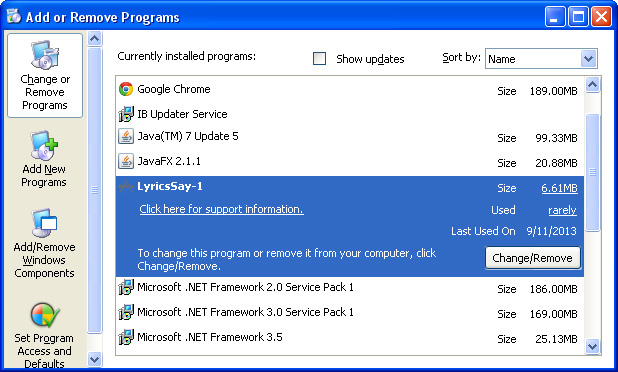
2. Remove rvzr2-a.akamaihd.net related programs from your computer using the Add/Remove Programs control panel (Windows XP) or Uninstall a program control panel (Windows 7 and Windows 8).

Go to the Start Menu. Select Control PanelAdd/Remove Programs.
If you are using Windows Vista or Windows 7, select Control PanelUninstall a Program.


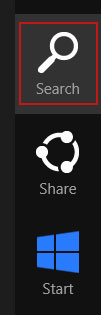
If you are using Windows 8, simply drag your mouse pointer to the right edge of the screen, select Search from the list and search for "control panel".


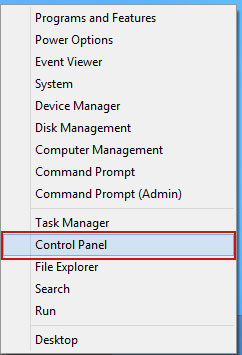
Or you can right-click on a bottom left hot corner (formerly known as the Start button) and select Control panel from there.


3. When the Add/Remove Programs or the Uninstall a Program screen is displayed, scroll through the list of currently installed programs and remove the following:
  • LyricsSay
  • Websteroids
  • ScorpionSaver
  • HD-Plus 3.5
  • and any other recently installed application


Simply select each application and click Remove. If you are using Windows Vista, Windows 7 or Windows 8, click Uninstall up near the top of that window. When youre done, please close the Control Panel screen.


Remove rvzr2-a.akamaihd.net pop-ups from Google Chrome:

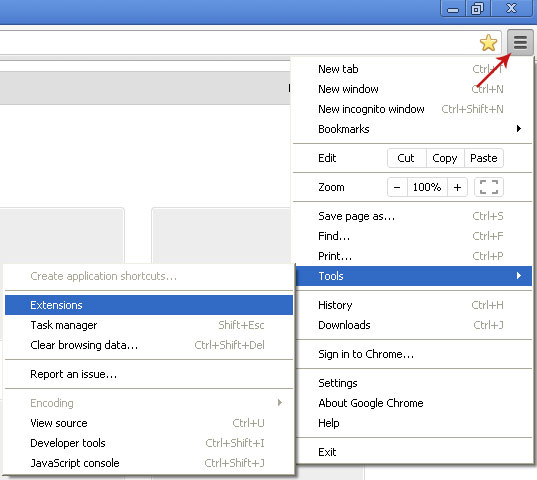
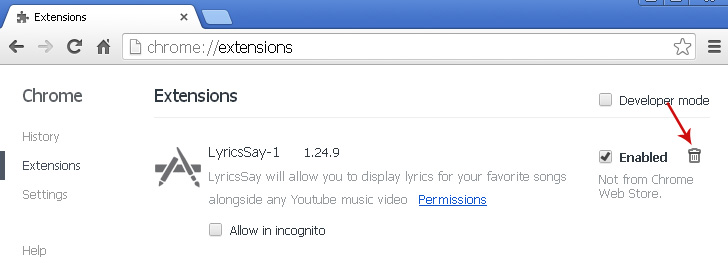
1. Click on Chrome menu button. Go to ToolsExtensions.


2. Click on the trashcan icon to remove LyricsSay, Websteroids, HD-Plus 3.5 and other extensions that you do not recognize.


Remove rvzr2-a.akamaihd.net pop-ups from Mozilla Firefox:

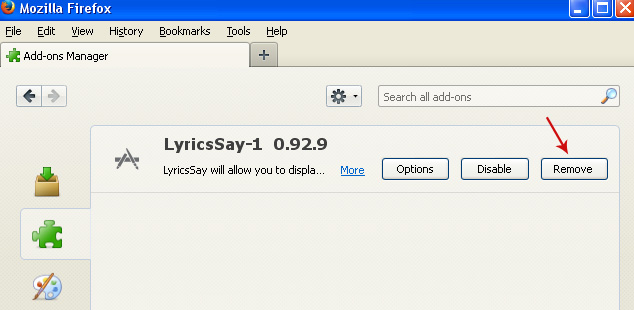
1. Open Mozilla Firefox. Go to ToolsAdd-ons.


2. Select Extensions. Click Remove button to remove LyricsSay, Websteroids, HD-Plus 3.5 and other extensions that you do not recognize.


Remove rvzr2-a.akamaihd.net pop-ups from Internet Explorer:

1. Open Internet Explorer. Go to ToolsManage Add-ons. If you have the latest version, simply click on the Settings button.


2. Select Toolbars and Extensions. Click Remove/Disable button to remove the browser add-ons listed above.

Read More..